
Database Schema Design Guide for Developers
Master the fundamentals and learn database schema design techniques. Build an efficient data architecture optimized for performance and easy maintenance.
Understanding Database Schema Design
Imagine moving into a new, fresh apartment. Probably your first instinct is to figure out where everything should go, right? Desk near the window, nightstand next to the bed, towel hanger in the bathroom. Your goal is to arrange your living space for maximum comfort, effortless navigation between rooms, and easy long-term maintenance.
That is exactly what database schema design is all about.
Instead of furniture, you are dealing with messy, real-world business data. Schema design is the intentional act of organizing that data into a structure that makes sense, is easy to navigate, and is built to handle future growth and maintenance.
Creating a solid database schema is not just about memorizing formulas or following strict textbook rules. It’s about understanding the principles that make databases really work and applying them thoughtfully to your specific application.
In this guide, we will go through the key aspects of schema design, covering what actually matters in day-to-day software development.
Why Database Schema Design is More Important Than You Think
A few years ago, a client came to us wanting to add some new features to an existing app. The previous dev team had rushed straight into writing backend code, barely giving the database schema a second thought.
You can probably guess what happened next. By the time the app hit production and started scaling, the technical debt was absolutely brutal. Fixing a simple bug took days instead of hours, and building anything new was next to impossible. It was a total nightmare.
That is the exact tax you pay when you skip the design phase.
On the other hand, if you prioritize your schema design, you will sense its benefits even in the early stages of your project. Here is what changes when you get the foundation right:
- Accelerated Development Speed: When your data boundaries and relationships are clearly mapped out upfront, writing backend code becomes trivial. Developers don't have to waste hours guessing where data lives or writing complex workarounds for messy tables.
- Optimized Performance by Default: A well-designed schema structures data efficiently from day one. By planning your relationships and indexes early, you prevent the data bottlenecks that slow down your application, often reducing query latency by 30% or more as your data grows.
- Seamless Application Scaling: As your business evolves and you need to ship new features, a clean schema easily accommodates changes. You can add new tables or fields without breaking existing queries or risking production data corruption.
The Core Components of Database Schema Design
To design a database that doesn't collapse under its own weight, you have to think like an architect. You can't just jump straight into writing SQL. You need to move from the abstract blueprint down to the concrete physical bricks.
Because of this, schema design components are divided into two distinct layers: The Blueprint (Logical Layer) and The Bricks (Physical Layer).
1. The Blueprint: The Logical ER Model
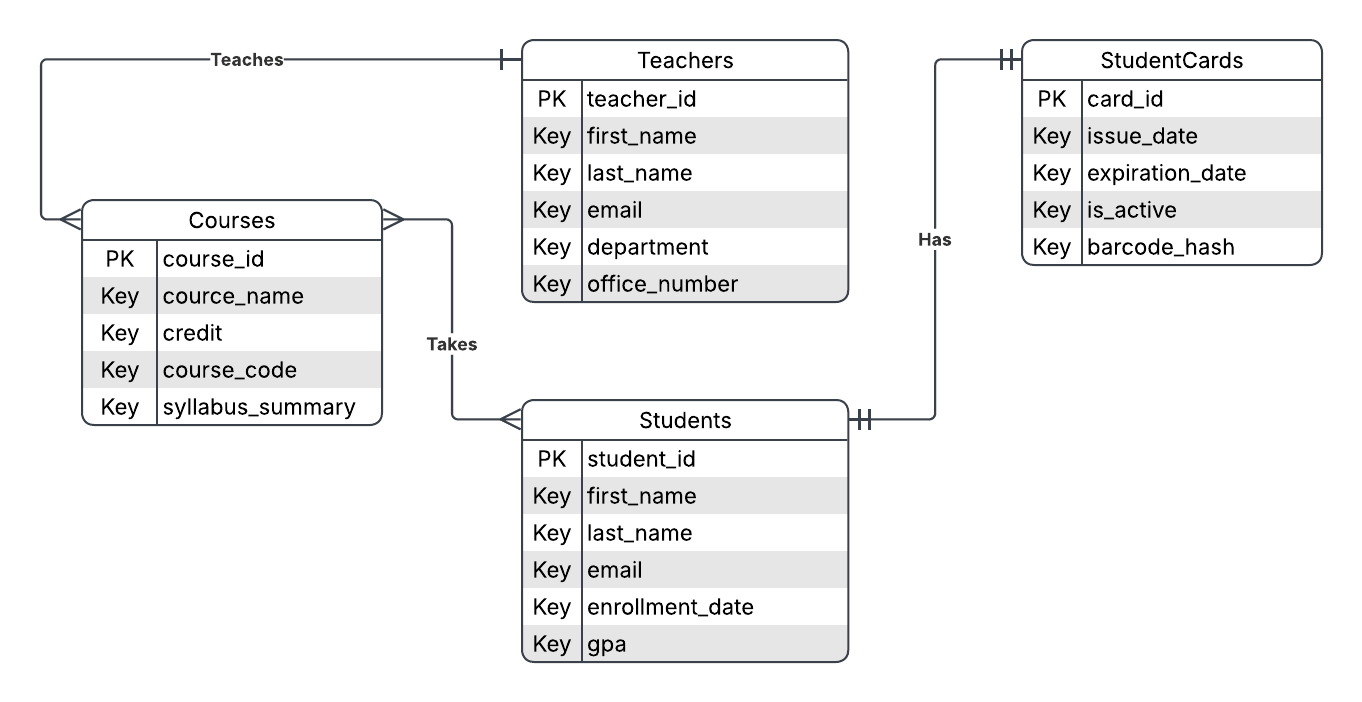
Before you open your database IDE, you map out the business logic using the Entity-Relationship (ER) model. This defines what you are building.
At this stage, we focus purely on logical concepts:
- Entities: These represent the essential, real-world "objects" that your system needs to track (e.g.,
StudentsandTeachers). - Attributes: These define the specific characteristics or properties of each entity (e.g., A
Studenthas anameand anemail). - Relationships: These establish the logical connections between two or more entities (e.g., A
Teacherteaches aCourse). - Primary Keys (PK): A unique identifier for each instance of an entity to ensure no duplicates exist (e.g.,
student_idforStudents). - Cardinality: This defines the numerical limits of a relationship. The three main types are:
- One-to-One (1:1): A
Studenthas exactly oneStudentCard. - One-to-Many (1:N): One
Teachercan teach severalCourses. - Many-to-Many (N:M): One
Studentcan enroll in multipleCourses.
- One-to-One (1:1): A
2. The Bricks: The Physical ER Model
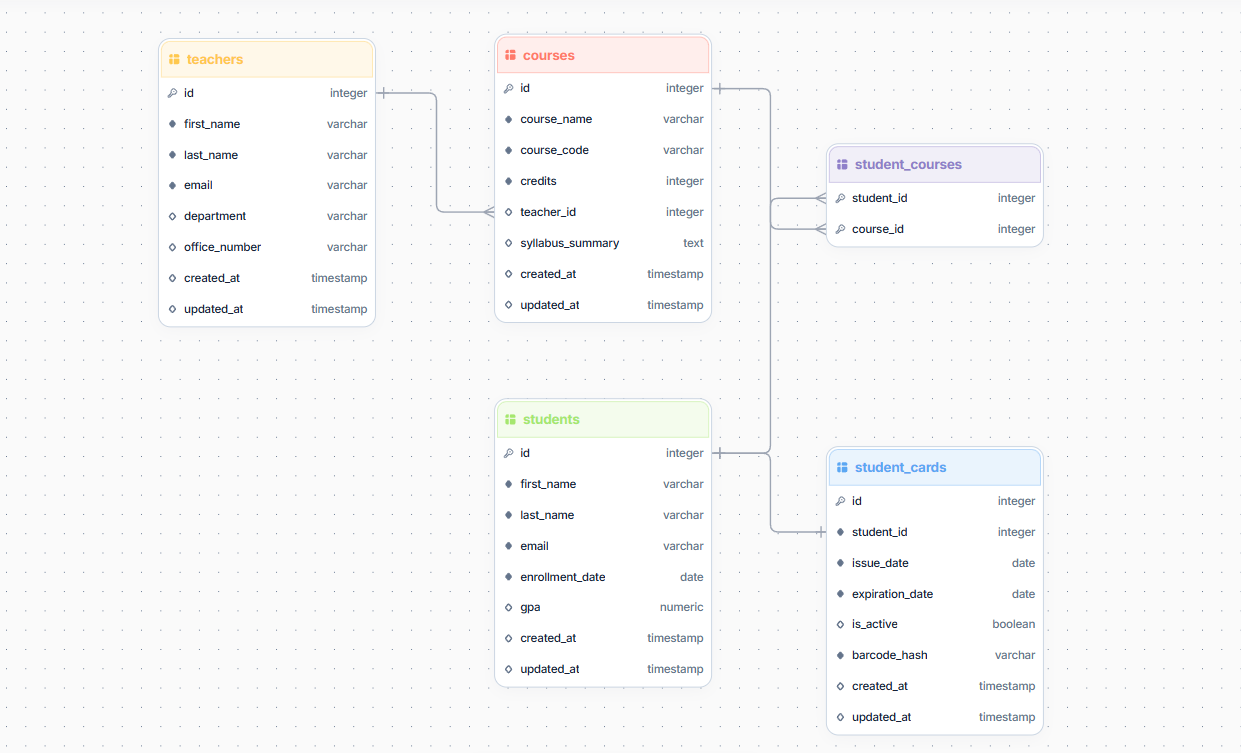
Once your blueprint is clear, you translate those abstract concepts into actual database objects inside your engine. This is how you physically build it:
- Tables: The concrete, physical containers where your entities come to life (e.g., the
studentstable). - Columns & Datatypes: The specific slots for data within a table. Unlike logical attributes, these must have explicit datatypes chosen for performance, space, and safety (e.g.,
enrollment_dateas aDATE,gpaas aNUMERIC(3,2)). - Primary Keys (PK): The physical column (or combination of columns) that uniquely identifies a row in a table. It is enforced by the database with a unique index to guarantee no two rows are identical.
- Foreign Keys (FK): The physical columns we add to a table to link it to another table's Primary Key. This is how we physically implement our logical relationship lines.
- For a 1:1 Relationship: The FK goes on the dependent table (e.g.,
student_idinsidestudent_cards) and must be marked asUNIQUE. - For a 1:N Relationship: The FK goes on the "Many" side table (e.g.,
teacher_idinsidecourses).
- For a 1:1 Relationship: The FK goes on the dependent table (e.g.,
- Junction Tables (Bridge Tables): Since relational database engines cannot directly link two tables in a Many-to-Many (N:M) relationship, we physically break it down into two One-to-Many (1:N) relationships using a third table (e.g.,
student_coursescontaining bothstudent_idandcourse_idas foreign keys). - Constraints: The engine-level guardrails that prevent bad data from entering your database (e.g.,
NOT NULLto force a value,CHECKto ensure a student's GPA is between 0.0 and 4.0). - Indexes: The hidden physical lookup maps (usually B-Trees) that the database engine uses to find records instantly without scanning the entire table.
SQL Code
Once the Physical ER Model is established, writing SQL comes naturally. Below is an example of a DDL (Data Definition Language) script generated directly by StackRender. It uses industry-standard transaction blocks (BEGIN and COMMIT) and isolates the relationship creation using clean ALTER TABLE constraints at the bottom:
BEGIN;

CREATE TABLE "student_courses" (
  student_id INTEGER NOT NULL,
  course_id INTEGER NOT NULL,
  PRIMARY KEY ("student_id", "course_id")
);

CREATE TABLE "courses" (
  id SERIAL NOT NULL PRIMARY KEY,
  course_name VARCHAR(255) NOT NULL,
  course_code VARCHAR(50) NOT NULL UNIQUE,
  credits INTEGER NOT NULL,
  teacher_id INTEGER NULL,
  syllabus_summary TEXT NULL,
  created_at TIMESTAMP NULL DEFAULT CURRENT_TIMESTAMP,
  updated_at TIMESTAMP NULL DEFAULT CURRENT_TIMESTAMP
);

CREATE TABLE "teachers" (
  id SERIAL NOT NULL PRIMARY KEY,
  first_name VARCHAR(255) NOT NULL,
  last_name VARCHAR(255) NOT NULL,
  email VARCHAR(255) NOT NULL UNIQUE,
  department VARCHAR(255) NULL,
  office_number VARCHAR(50) NULL,
  created_at TIMESTAMP NULL DEFAULT CURRENT_TIMESTAMP,
  updated_at TIMESTAMP NULL DEFAULT CURRENT_TIMESTAMP
);

CREATE TABLE "student_cards" (
  id SERIAL NOT NULL PRIMARY KEY,
  student_id INTEGER NOT NULL UNIQUE,
  issue_date DATE NOT NULL,
  expiration_date DATE NOT NULL,
  is_active BOOLEAN NULL DEFAULT TRUE,
  barcode_hash VARCHAR(255) NOT NULL UNIQUE,
  created_at TIMESTAMP NULL DEFAULT CURRENT_TIMESTAMP,
  updated_at TIMESTAMP NULL DEFAULT CURRENT_TIMESTAMP
);

CREATE TABLE "students" (
  id SERIAL NOT NULL PRIMARY KEY,
  first_name VARCHAR(255) NOT NULL,
  last_name VARCHAR(255) NOT NULL,
  email VARCHAR(255) NOT NULL UNIQUE,
  enrollment_date DATE NOT NULL,
  gpa NUMERIC(3, 2) NULL,
  created_at TIMESTAMP NULL DEFAULT CURRENT_TIMESTAMP,
  updated_at TIMESTAMP NULL DEFAULT CURRENT_TIMESTAMP
);

ALTER TABLE "courses"
ADD CONSTRAINT "fk_teachers_courses" FOREIGN KEY (teacher_id) REFERENCES "teachers" (id);

ALTER TABLE "student_courses"
ADD CONSTRAINT "fk_students_student_courses" FOREIGN KEY (student_id) REFERENCES "students" (id);

ALTER TABLE "student_courses"
ADD CONSTRAINT "fk_courses_student_courses" FOREIGN KEY (course_id) REFERENCES "courses" (id);

ALTER TABLE "student_cards"
ADD CONSTRAINT "fk_students_student_cards" FOREIGN KEY (student_id) REFERENCES "students" (id);

COMMIT;
Looking to transition between visual diagrams and database execution? Check out our dedicated step-by-step guides:
- From Design to Code: Learn how to translate visual models into production scripts with our guide on how to generate SQL from ERD.
- From Code to Visualization: Have an existing database schema? See how to inspect and reverse-engineer your database structure with our guide on how to convert SQL DDL to ERD.
How to Design a Database Schema in 7 Steps
We took the time to craft a battle-tested, 7-step framework for effective database design. But let's be honest, nobody actually learns database architecture by memorizing a bulleted list of abstract rules.
The absolute best way to learn database design is by actually building one.
To show you how this framework works in the real world, we are going to walk through a practical, hands-on example. Together, we will break down the business logic step-by-step, design the schema, and write the final production-ready SQL code.
The Use Case: Building "DevSpace"
Imagine a client sends you the following feature request for a new project management platform called DevSpace:
We want to build a workspace app called DevSpace for engineering teams to manage their software projects. Here is how it needs to work:
- Workspaces & Users: Companies should be able to create a Workspace (like 'Acme Corp'). Inside a workspace, we have Users who register with an email. Each user gets one private Profile page containing a bio and avatar.
- Projects & Roles: Within a workspace, teams can set up Projects. Since not everyone has the same permissions, we need to track a user's Project Role (like 'Manager' or 'Developer') specifically for each project they are assigned to.
- Tasks & Epics: Projects contain Tasks. To keep work organized, we want to allow task hierarchies—meaning some tasks can have parent Epics (which are also just larger tasks), and tasks can have subtasks.
- Comments & Attachments: Users need to collaborate. They must be able to leave multiple Comments on any task. Additionally, users can upload multiple Attachments (like screenshots or PDFs) to a task, and we need to keep track of the file size and download URL for each.
Step 1: Understand Your Requirements
Before jumping into your design tool, stop and ask yourself three foundational questions: What am I building? Who is it for? What problem is this database trying to solve?
To answer these questions effectively, you must balance two critical factors:
1. Project Scope (Define the Boundaries)
Stay strictly within the boundaries of what your application actually needs to do. For DevSpace, we are building a workspace management app for engineering teams. That is our entire scope. Trying to design tables for corporate finance, client invoicing, or payroll right now is a complete waste of time and leads to over-engineering.
2. Technical Deduction (Read Between the Lines)
This is what separates average engineers from the pros. Non-technical clients will never explicitly hand you a clean list of database entities and attributes, it is your job to deduce them.
- If a client says, "Users should be able to log in with GitHub or Google (OAuth)," you immediately deduce that you need to store authentication
providersandexternal IDs. - If a client says, "I need a password reset feature," it is up to you to know you will need to store temporary
reset tokensandexpiration timestamps.
While technical deduction comes with research and experience, you can also use it to anticipate inevitable requirements within your scope. For example, the DevSpace requirements mention Tasks and Projects, but say nothing about Task Priority or Project Status. Because these are essential to any project management tool, anticipating them now saves massive database migration headaches later.
💡 The Golden Rule of Requirements: Never go outside your project scope, but never be afraid to unleash your technical creativity inside your scope.
Step 2: Define Your Entities & Attributes
Once you have established your scope, it is time to extract your core Entities (which will become your tables) and their Attributes (which will become your columns).
Using our requirements for DevSpace, we can instantly identify the obvious nouns. However, applying our rule of Technical Deduction, we will enrich these entities with the industry-standard columns that real-world applications actually require to function:
1. Workspaces The containers for all company projects.
- Attributes:
id,name,slug(deduced: for clean, unique URL routing, e.g., devspace.com/acme),created_at.
2. Users The authentication records for people accessing the system.
- Attributes:
id,email,password_hash,is_active(deduced: to easily disable accounts without deleting their data),created_at.
3. Profiles The public-facing personal details for each user.
- Attributes:
id,user_id,bio,avatar_url,updated_at.
4. Projects The specific initiatives managed within a workspace.
- Attributes:
id,workspace_id,name,status(deduced: 'Active', 'Archived', 'Completed' to filter dashboards),created_at.
5. Project Members (Join Entity) The link between users and projects, tracking who has access to what.
- Attributes:
project_id,user_id,role(deduced: storing the role here allows a single user to be a 'Developer' in Project A, but a 'Manager' in Project B),joined_at.
6. Tasks The individual pieces of work.
- Attributes:
id,project_id,parent_task_id(deduced: recursive pointer to allow subtasks/epics),title,description,status(deduced: 'Backlog', 'In Progress', 'Done'),priority(deduced: 'Low', 'Medium', 'High'),due_date(deduced: essential for planning task delivery),created_at.
7. Comments The team discussion history on individual tasks.
- Attributes:
id,task_id,user_id,content,created_at.
8. Attachments The media or documentation uploaded to support tasks.
- Attributes:
id,task_id,file_name,file_size_bytes(deduced: storing bytes is essential for managing storage limits),file_url,uploaded_at.
Step 3: Define Your Relationships
With your entities and attributes defined, you need to map out how these tables connect to one another. Identifying the correct cardinality (1:1, 1:N, N:M, or self-referential) determines where your foreign keys will eventually live.
Here is the relationship map for DevSpace:
1. Users & Profiles (One-to-One / 1:1)
- The Rule: A
Userhas exactly oneProfile, and aProfilebelongs to exactly oneUser. - The Connection: The
profilestable will link to theuserstable.
2. Workspaces & Projects (One-to-Many / 1:N)
- The Rule: A
Workspacecan host multipleProjects, but aProjectcan only belong to a singleWorkspace. - The Connection: The
projectstable will link to theworkspacestable.
3. Users & Projects (Many-to-Many / N:M)
- The Rule: A
Usercan be assigned to multipleProjects, and aProjectwill have multipleUsersworking on it. - The Connection: Relational databases cannot link two tables directly in an N:M relationship. We resolve this by creating the
project_membersjoin table. This table linksusersandprojectswhile storing their specific project role.
4. Projects & Tasks (One-to-Many / 1:N)
- The Rule: A
Projectcan contain manyTasks, but aTaskmust belong to exactly oneProject. - The Connection: The
taskstable will link to theprojectstable.
5. Tasks & Tasks (Self-Referential One-to-Many / 1:N)
- The Rule: A
Task(acting as a subtask) can optionally belong to a parentTask(acting as an Epic). A single parent task can have many subtasks. - The Connection: The
taskstable will have a recursive link pointing back to its own primary key.
6. Tasks, Users, & Comments (Double One-to-Many / 1:N)
- The Rule: A
Taskcan have multipleComments, but aCommentbelongs to oneTask. Simultaneously, aUsercan author multipleComments, but aCommenthas only one author. - The Connection: The
commentstable will contain links to both thetasksanduserstables.
7. Tasks & Attachments (One-to-Many / 1:N)
- The Rule: A
Taskcan have multiple uploadedAttachments, but anAttachmentis tied to only oneTask. - The Connection: The
attachmentstable will link to thetaskstable.
Step 4: Design Your Entity Relationship Diagram (ERD)
Here comes the fun part. If you executed the last three steps effectively, designing your Entity Relationship Diagram (ERD) will come naturally.
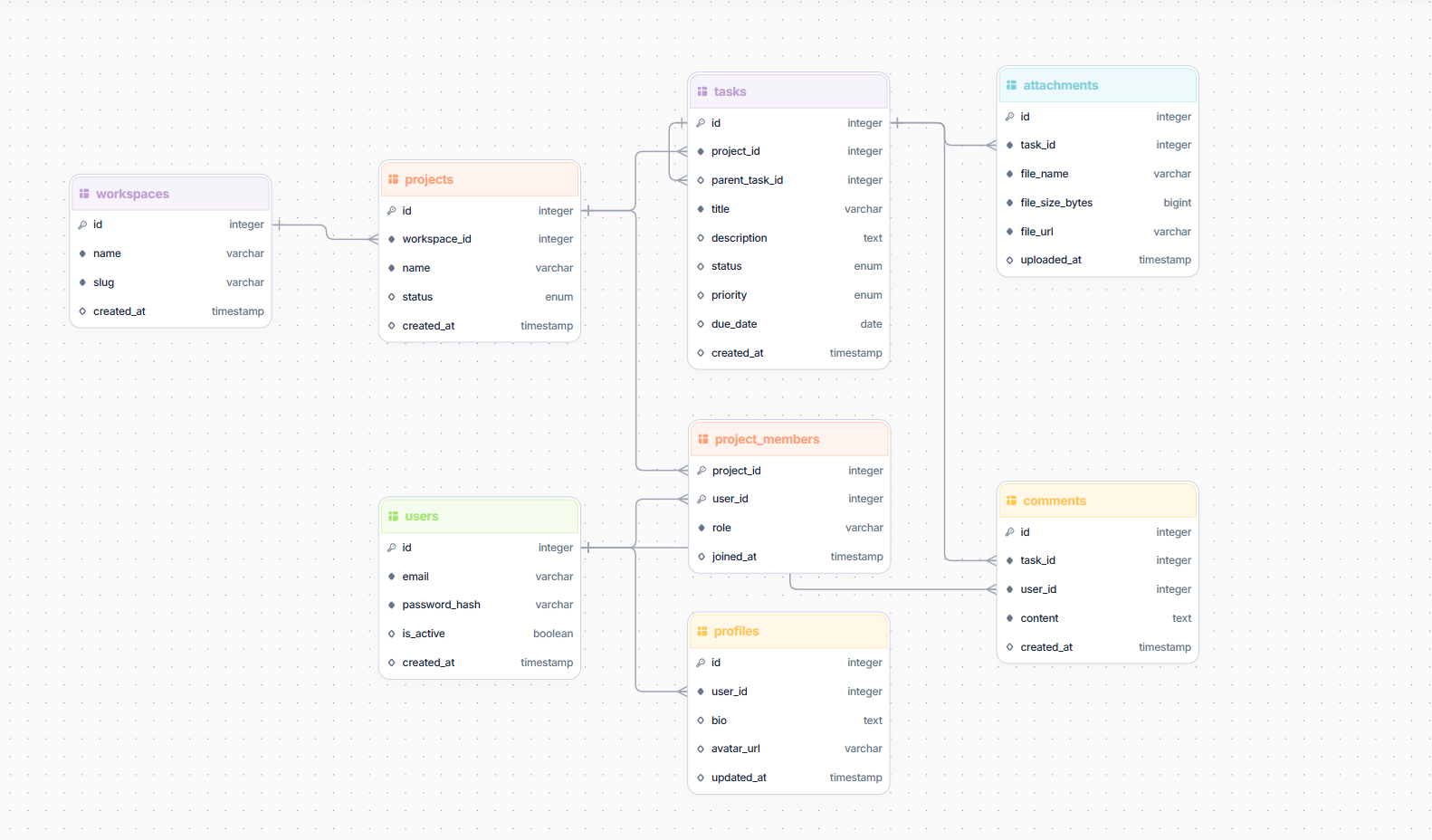
If you use StackRender as your database schema design tool, you don't just draw abstract boxes. You can directly apply real data types, modifiers (like NULL or NOT NULL), unique constraints, and default values directly to your columns as you design.
This allows you to bridge the gap instantly, jumping straight from the logical design layer to the physical database layer while you build.
Step 5: Constraints & Indexing
Before you generate your production SQL code, you must establish database-level constraints and design a smart indexing strategy. These two steps are critical for maintaining data integrity (preventing garbage data from entering your tables) and optimizing query performance as your application grows.
1. Database Constraints
Constraints are the ultimate line of defense for your data. Even if your application code has validation bugs, constraints guarantee your database remains clean and accurate. For our DevSpace schema, we should apply:
- Unique Constraints: The
users.emailandworkspaces.slugcolumns must be unique. This prevents duplicate user accounts and ensures URL routes (likedevspace.com/acme) remain completely unique. - Not Null Constraints: Critical columns like
users.password_hash,projects.workspace_id, andtasks.titlemust never be empty (NOT NULL). - Check Constraints (Optional but Recommended): You can restrict columns like
tasks.priorityto only accept specific values (e.g.,'Low','Medium','High').
2. Database Indexing
Without indexes, your database must perform a slow "sequential scan" (reading every single row) to find what it needs. Indexes act like a book index, allowing the database engine to jump straight to the correct records.
For the DevSpace schema, we should index the columns that are frequently used in WHERE clauses, JOIN conditions, and sorting:
- Foreign Keys (JOIN Optimization): Relational databases do not automatically index foreign keys. You should index foreign keys that are constantly joined, such as
projects.workspace_id,tasks.project_id, andcomments.task_id. - Unique Lookup Columns: Since we frequently look up users by email and workspaces by slug, indexing
users.emailandworkspaces.slugis essential (though SQL databases usually create these automatically when you apply aUNIQUEconstraint). - High-Frequency Query Filters: In a project management app, developers constantly filter tasks by status or priority. Adding a composite index on
(project_id, status)will drastically speed up project dashboard load times.
Step 6: Write Production SQL (DDL)
With our entities, relationships, constraints, and indexes fully mapped out, we can translate our logical design into physical SQL code.
Below is the production-ready PostgreSQL DDL script for our DevSpace workspace. This script groups our schema in a transaction block, defines custom ENUM types for statuses and priorities, creates our tables and optimized indexes, and establishes foreign key constraints:
BEGIN;

-- Custom ENUM types for specific workflows
CREATE TYPE "tasks_status_enum" AS ENUM('Backlog', 'In Progress', 'Done');
CREATE TYPE "tasks_priority_enum" AS ENUM('Low', 'Medium', 'High');
CREATE TYPE "projects_status_enum" AS ENUM('Active', 'Archived', 'Completed');

-- 1. Workspaces
CREATE TABLE "workspaces" (
  id SERIAL NOT NULL PRIMARY KEY,
  name VARCHAR(255) NOT NULL,
  slug VARCHAR(255) NOT NULL UNIQUE,
  created_at TIMESTAMP NULL DEFAULT CURRENT_TIMESTAMP
);
CREATE INDEX "workspaces_slug_index" ON "workspaces" ("slug");

-- 2. Users
CREATE TABLE "users" (
  id SERIAL NOT NULL PRIMARY KEY,
  email VARCHAR(255) NOT NULL UNIQUE,
  password_hash VARCHAR(255) NOT NULL,
  is_active BOOLEAN NULL DEFAULT TRUE,
  created_at TIMESTAMP NULL DEFAULT CURRENT_TIMESTAMP
);
CREATE INDEX "users_email_index" ON "users" ("email");

-- 3. Profiles (1:1 with Users)
CREATE TABLE "profiles" (
  id SERIAL NOT NULL PRIMARY KEY,
  user_id INTEGER NOT NULL,
  bio TEXT NULL,
  avatar_url VARCHAR(255) NULL,
  updated_at TIMESTAMP NULL DEFAULT CURRENT_TIMESTAMP
);

-- 4. Projects (1:N with Workspaces)
CREATE TABLE "projects" (
  id SERIAL NOT NULL PRIMARY KEY,
  workspace_id INTEGER NOT NULL,
  name VARCHAR(255) NOT NULL,
  status projects_status_enum NULL DEFAULT 'Active',
  created_at TIMESTAMP NULL DEFAULT CURRENT_TIMESTAMP
);
CREATE INDEX "projects_workspace_id_index" ON "projects" ("workspace_id");

-- 5. Project Members (N:M with composite PK)
CREATE TABLE "project_members" (
  project_id INTEGER NOT NULL,
  user_id INTEGER NOT NULL,
  role VARCHAR(255) NOT NULL,
  joined_at TIMESTAMP NULL DEFAULT CURRENT_TIMESTAMP,
  PRIMARY KEY ("project_id", "user_id")
);

-- 6. Tasks (with parent_task_id for Epics/Subtasks)
CREATE TABLE "tasks" (
  id SERIAL NOT NULL PRIMARY KEY,
  project_id INTEGER NOT NULL,
  parent_task_id INTEGER NULL,
  title VARCHAR(255) NOT NULL,
  description TEXT NULL,
  status tasks_status_enum NULL DEFAULT 'Backlog',
  priority tasks_priority_enum NULL DEFAULT 'Medium',
  due_date DATE NULL,
  created_at TIMESTAMP NULL DEFAULT CURRENT_TIMESTAMP
);
CREATE INDEX "tasks_project_id_index" ON "tasks" ("project_id");
CREATE INDEX "tasks_project_status_index" ON "tasks" ("project_id", "status");

-- 7. Comments
CREATE TABLE "comments" (
  id SERIAL NOT NULL PRIMARY KEY,
  task_id INTEGER NOT NULL,
  user_id INTEGER NOT NULL,
  content TEXT NOT NULL,
  created_at TIMESTAMP NULL DEFAULT CURRENT_TIMESTAMP
);
CREATE INDEX "comments_task_id_index" ON "comments" ("task_id");

-- 8. Attachments
CREATE TABLE "attachments" (
  id SERIAL NOT NULL PRIMARY KEY,
  task_id INTEGER NOT NULL,
  file_name VARCHAR(255) NOT NULL,
  file_size_bytes BIGINT NOT NULL,
  file_url VARCHAR(255) NOT NULL,
  uploaded_at TIMESTAMP NULL DEFAULT CURRENT_TIMESTAMP
);

-- Establish Foreign Key Constraints
ALTER TABLE "tasks" ADD CONSTRAINT "fk_tasks_tasks" FOREIGN KEY (parent_task_id) REFERENCES "tasks" (id);
ALTER TABLE "projects" ADD CONSTRAINT "fk_workspaces_projects" FOREIGN KEY (workspace_id) REFERENCES "workspaces" (id);
ALTER TABLE "project_members" ADD CONSTRAINT "fk_users_project_members" FOREIGN KEY (user_id) REFERENCES "users" (id);
ALTER TABLE "project_members" ADD CONSTRAINT "fk_projects_project_members" FOREIGN KEY (project_id) REFERENCES "projects" (id);
ALTER TABLE "comments" ADD CONSTRAINT "fk_tasks_comments" FOREIGN KEY (task_id) REFERENCES "tasks" (id);
ALTER TABLE "comments" ADD CONSTRAINT "fk_users_comments" FOREIGN KEY (user_id) REFERENCES "users" (id);
ALTER TABLE "profiles" ADD CONSTRAINT "fk_users_profiles" FOREIGN KEY (user_id) REFERENCES "users" (id);
ALTER TABLE "attachments" ADD CONSTRAINT "fk_tasks_attachments" FOREIGN KEY (task_id) REFERENCES "tasks" (id);
ALTER TABLE "tasks" ADD CONSTRAINT "fk_projects_tasks" FOREIGN KEY (project_id) REFERENCES "projects" (id);

COMMIT;
Step 7: Document & Review
A database schema is incredibly difficult to restructure once production data is loaded. Before you write a single line of application code, take these two final steps:
1. Document Everything
Write down clear descriptions for every table, field, relationship, and constraint. This ensures that any developer joining the project later instantly understands the data model without guessing.
2. Conduct a Peer Review
Have at least one other developer or database analyst review the schema. A fresh set of eyes will catch missing indexes, redundant columns, or architectural bottlenecks before they ever reach production.
Database Schema Design Best Practices
To wrap up our guide, here are four simple, unwritten industry standards essential for good database schema design that will save you and your team hundreds of hours of debugging and maintenance down the road.
1. Use Singular, Lowercase snake_case
Be completely consistent with how you name things. Mixing camelCase, uppercase, and singular/plural names makes writing queries a nightmare because you constantly have to look up table names.
- Bad:
tbl_User,ProjectTasks,workspaceID - Good:
users,project_tasks,workspace_id
2. Standardize Suffixes for IDs and Dates
Make your schema instantly readable. Any developer looking at your database should instantly know what type of data a column holds just by looking at its name.
- For Foreign Keys: Always use the
_idsuffix (e.g.,user_id, notuserFKoruserRef). - For Timestamps: Always use the
_atsuffix (e.g.,created_at,updated_at, anddeleted_atwhen implementing soft delete). - For Dates: Always use the
_datesuffix (e.g.,due_date,birth_date).
3. Store Timestamps in UTC
Never store timestamps in your local server's timezone. If your server is in New York but your user is in Paris, displaying dates will quickly become a buggy mess.
- The Rule: Always configure your timestamp columns to use UTC (or
TIMESTAMP WITH TIME ZONEin PostgreSQL). Let your frontend handle converting the UTC time to the user's local device timezone.
4. Avoid Storing Calculated Data
It is incredibly tempting to store calculated values directly in a table to make things easy. However, this is the easiest way to end up with out-of-sync, stale data.
- Bad: Adding a
total_tasks_countcolumn inside theprojectstable. If a task is deleted and your code fails to decrement this counter, your data is now corrupted. - Good: Keep it simple and query the count dynamically when you need it:
SELECT COUNT(id) FROM tasks WHERE project_id = 42;
Frequently Asked Questions (FAQs)
Here are the answers to some of the most common questions developers ask when designing database schemas:
1. Should I use plural or singular names for my tables?
While there is no technical difference to the database engine, plural names (like users, tasks) have become the industry standard for relational databases. Think of a table as a container holding a collection of items. A row represents a single user, but the table itself holds users. Whichever you choose, the golden rule is to remain completely consistent across your entire schema.
2. Should I use UUIDs or Auto-Incrementing Integers (SERIAL) for Primary Keys?
Use both, but for different purposes:
- Auto-incrementing integers (like
SERIALorBIGINT) are highly performant, use less storage, and keep index sorting extremely fast. Use them internally for database joins and foreign key relationships. - UUIDs (universally unique identifiers) are perfect for public-facing identifiers. Exposing database IDs in your URLs (e.g.,
devspace.com/projects/42) makes it incredibly easy for malicious users to guess IDs and scrape your data. Use UUIDs or text slugs for public URLs and APIs.
3. What is the difference between a Logical Schema and a Physical Schema?
- Logical Schema: The conceptual blueprint of your data. It defines what data you need to store and how entities relate to one another (using abstract terms like Entities, Attributes, and Cardinality) without worrying about the underlying database engine.
- Physical Schema: The actual implementation of that blueprint inside your database engine. It defines the concrete tables, specific data types (e.g.,
VARCHAR,INT,UUID), constraints, indexes, and database-specific features.
4. When should I use a NULL value versus a default value?
Use NULL only when a value is truly unknown, missing, or optional (e.g., a user's bio or a task's due_date). If a column should always have a starting state, define a sensible default value (e.g., setting a task's status default to 'Backlog' or setting is_active to TRUE). This keeps your queries cleaner and avoids having to constantly write WHERE column IS NOT NULL checks.
5. How many indexes are too many?
While indexes make reading data (SELECT queries) incredibly fast, they slow down writing data (INSERT, UPDATE, DELETE queries) because the database must rebuild the index map every time data changes.
- The Rule of Thumb: Always index your foreign keys and columns frequently used in
WHERE,ORDER BY, andJOINclauses. Avoid indexing columns with very low selectivity (like a booleanis_activecolumn) or columns that are rarely queried.