
Data Types
Learn about the database data types supported by StackRender across different database dialects such as PostgreSQL, MySQL, MariaDB, Oracle, SQL Server and SQLite.
Introduction
This guide explains how each data type works and the field attributes and modifiers you can configure, including nullability, uniqueness, default values, charset, collation, and other type-specific options.
PostgreSQL
-
Data Types
The following table lists the PostgreSQL data types supported by StackRender along with the available field modifiers. These modifiers allow you to control how each field behaves in your schema, including default values, auto-incrementing, precision, length, and enumerated options.
Data Type Default Value Auto Increment Precision Scale Length Enum Values smallint ✔️ ✔️ ❌ ❌ ❌ ❌ integer ✔️ ✔️ ❌ ❌ ❌ ❌ bigint ✔️ ✔️ ❌ ❌ ❌ ❌ numeric ✔️ ❌ ✔️ ✔️ ❌ ❌ real ✔️ ❌ ❌ ❌ ❌ ❌ double precision ✔️ ❌ ❌ ❌ ❌ ❌ money ✔️ ❌ ❌ ❌ ❌ ❌ varchar ✔️ ❌ ❌ ❌ ✔️ ❌ char ✔️ ❌ ❌ ❌ ✔️ ❌ text ✔️ ❌ ❌ ❌ ❌ ❌ bytea ❌ ❌ ❌ ❌ ❌ ❌ bit ❌ ❌ ❌ ❌ ✔️ ❌ varbit ❌ ❌ ❌ ❌ ✔️ ❌ timestamp ✔️ ❌ ✔️ ❌ ❌ ❌ timestamptz ✔️ ❌ ✔️ ❌ ❌ ❌ date ✔️ ❌ ❌ ❌ ❌ ❌ time ✔️ ❌ ✔️ ❌ ❌ ❌ boolean ✔️ ❌ ❌ ❌ ❌ ❌ enum ✔️ ❌ ❌ ❌ ❌ ✔️ point ❌ ❌ ❌ ❌ ❌ ❌ line ❌ ❌ ❌ ❌ ❌ ❌ lseg ❌ ❌ ❌ ❌ ❌ ❌ box ❌ ❌ ❌ ❌ ❌ ❌ path ❌ ❌ ❌ ❌ ❌ ❌ polygon ❌ ❌ ❌ ❌ ❌ ❌ circle ❌ ❌ ❌ ❌ ❌ ❌ uuid ✔️ ❌ ❌ ❌ ❌ ❌ json ❌ ❌ ❌ ❌ ❌ ❌ jsonb ❌ ❌ ❌ ❌ ❌ ❌ xml ❌ ❌ ❌ ❌ ❌ ❌ cidr ❌ ❌ ❌ ❌ ❌ ❌ inet ❌ ❌ ❌ ❌ ❌ ❌ macaddr ❌ ❌ ❌ ❌ ❌ ❌ tsvector ❌ ❌ ❌ ❌ ❌ ❌ tsquery ❌ ❌ ❌ ❌ ❌ ❌ Some data types in PostgreSQL have special behaviors or options that go beyond standard fields. StackRender supports these PostgreSQL-specific features, allowing you to define advanced database structures such as ENUM types, UUIDs, and SERIALs. These features provide more flexibility and control over your schema design.
-
PostgreSQL Type (ENUMs)
To create an ENUM type in PostgreSQL using StackRender, start by creating a regular field and giving it a name. In the type combobox, search for and select ENUM.
Once the field settings are opened in the right panel, extra options will appear. You’ll see a multi-value input where you can add your enum values. Enter each value followed by
ENTER:value_1,
ENTER, value_2,ENTER, value_3,ENTER...Check the following demo to see how the ENUM is created and how it is reflected in the generated SQL output.
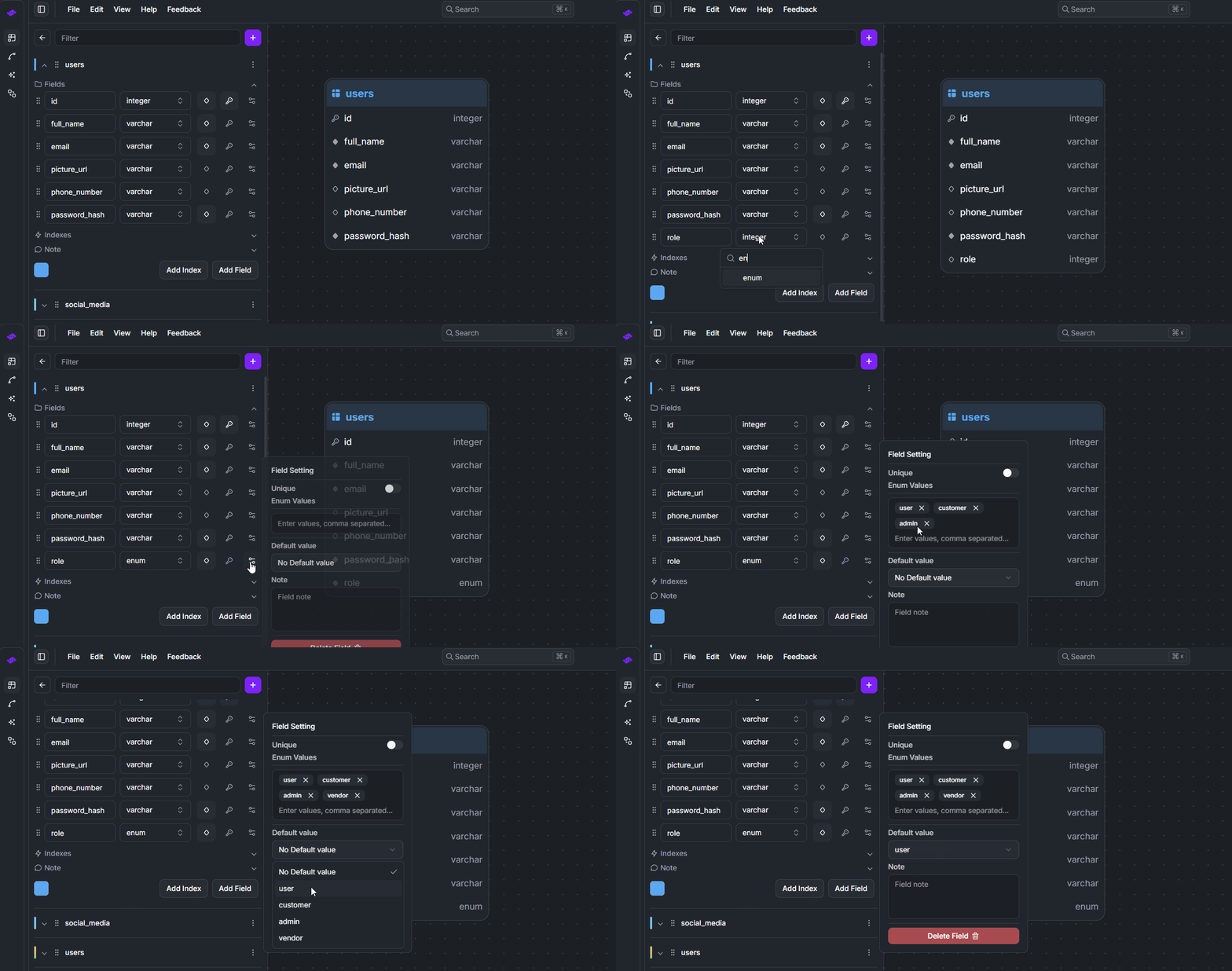 StackRender automatically generates the PostgreSQL ENUM type and assigns it a name in the following format:
 <table_name>_<column_name>_enum. See the generated SQL below:CREATE TYPE "users_role_enum" AS ENUM('user', 'customer', 'admin', 'vendor'); CREATE TABLE "users" ( id SERIAL NOT NULL PRIMARY KEY, full_name VARCHAR NOT NULL, email VARCHAR(100) NOT NULL UNIQUE, picture_url VARCHAR NULL, phone_number VARCHAR NULL UNIQUE, password_hash VARCHAR NOT NULL, role users_role_enum NOT NULL DEFAULT 'user' );
StackRender automatically applies type casting when a field’s data type is changed, including ENUM types, to ensure data integrity and prevent migration errors.
-
UUID
The UUID data type in PostgreSQL supports an additional option for generating a
UUIDv4default value.To enable it, create a field with the UUID data type, then open the field settings panel. In the Default Value selector, choose the Random Value option.
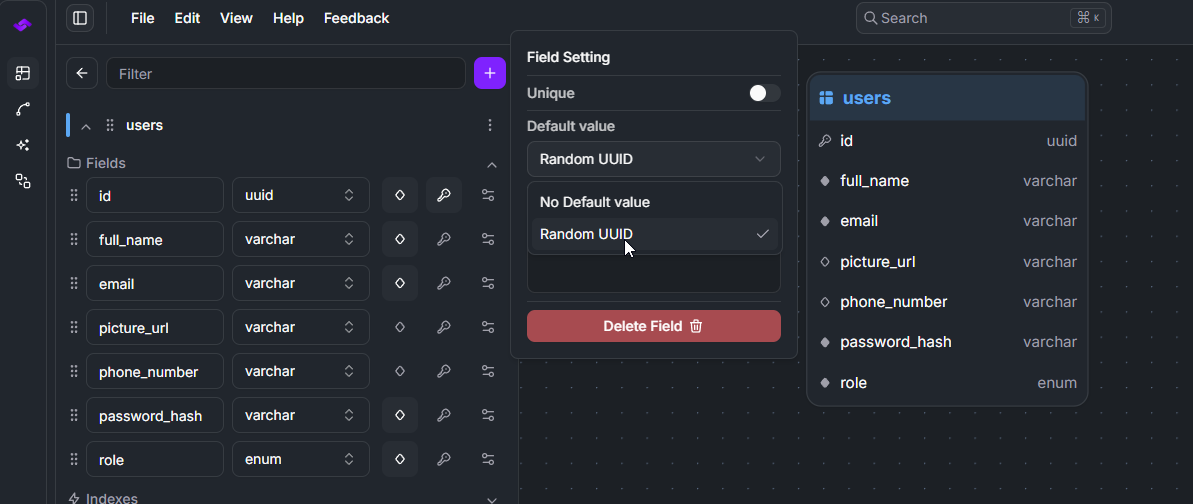 Once configured, StackRender will automatically generate the appropriate UUIDv4 default expression in the resulting SQL output.
CREATE TABLE "users" ( id UUID NOT NULL DEFAULT gen_random_uuid() PRIMARY KEY, full_name VARCHAR NOT NULL ); -
SERIAL Types
PostgreSQL provides special SERIAL types that combine an integer column with auto-increment behavior. In StackRender, you can define a SERIAL field by creating a regular integer field and enabling Auto Increment in the field settings.
StackRender will automatically generate the appropriate SERIAL type in the SQL output.
-
PostgreSQL supports three SERIAL variants:
SMALLSERIAL (2 bytes) : Equivalent to a
SMALLINTwith auto-increment.SMALLSERIAL=SMALLINT+Auto IncrementSERIAL (4 bytes) : Equivalent to an
INTEGERwith auto-increment.SERIAL=INTEGER+Auto IncrementBIGSERIAL (8 bytes) : Equivalent to a
BIGINTwith auto-increment.BIGSERIAL=BIGINT+Auto Increment
-
-
MySQL
-
Data Types
The following table lists the MySQL data types supported by StackRender along with their available field attributes and modifiers. These modifiers allow you to control how each field behaves in your schema, including default values, auto-increment, uniqueness, length, precision, scale, unsigned and zerofill options, charset and collation settings, and enumerated values.
Data Type Default Value Auto Increment Unique Length Precision Scale Unsigned Zerofill Charset Collate Values integer ✔️ ✔️ ✔️ ✔️ ❌ ❌ ✔️ ✔️ ❌ ❌ ❌ tinyint ✔️ ✔️ ✔️ ✔️ ❌ ❌ ✔️ ✔️ ❌ ❌ ❌ smallint ✔️ ✔️ ✔️ ✔️ ❌ ❌ ✔️ ✔️ ❌ ❌ ❌ mediumint ✔️ ✔️ ✔️ ✔️ ❌ ❌ ✔️ ✔️ ❌ ❌ ❌ bigint ✔️ ✔️ ✔️ ✔️ ❌ ❌ ✔️ ✔️ ❌ ❌ ❌ float ✔️ ❌ ✔️ ❌ ✔️ ✔️ ✔️ ✔️ ❌ ❌ ❌ double ✔️ ❌ ✔️ ❌ ✔️ ✔️ ✔️ ✔️ ❌ ❌ ❌ decimal ✔️ ❌ ✔️ ❌ ✔️ ✔️ ✔️ ✔️ ❌ ❌ ❌ boolean ✔️ ❌ ✔️ ❌ ❌ ❌ ❌ ❌ ❌ ❌ ❌ date ✔️ ❌ ✔️ ❌ ❌ ❌ ❌ ❌ ❌ ❌ ❌ datetime ✔️ ❌ ✔️ ❌ ✔️ ❌ ❌ ❌ ❌ ❌ ❌ timestamp ✔️ ❌ ✔️ ❌ ✔️ ❌ ❌ ❌ ❌ ❌ ❌ time ✔️ ❌ ✔️ ❌ ✔️ ❌ ❌ ❌ ❌ ❌ ❌ year ✔️ ❌ ✔️ ❌ ❌ ❌ ❌ ❌ ❌ ❌ ❌ char ✔️ ❌ ✔️ ✔️ ❌ ❌ ❌ ❌ ✔️ ✔️ ❌ varchar ✔️ ❌ ✔️ ✔️ ❌ ❌ ❌ ❌ ✔️ ✔️ ❌ text ❌ ❌ ❌ ❌ ❌ ❌ ❌ ❌ ✔️ ✔️ ❌ tinytext ❌ ❌ ❌ ❌ ❌ ❌ ❌ ❌ ✔️ ✔️ ❌ mediumtext ❌ ❌ ❌ ❌ ❌ ❌ ❌ ❌ ✔️ ✔️ ❌ longtext ❌ ❌ ❌ ❌ ❌ ❌ ❌ ❌ ✔️ ✔️ ❌ binary ❌ ❌ ✔️ ✔️ ❌ ❌ ❌ ❌ ❌ ❌ ❌ varbinary ❌ ❌ ✔️ ✔️ ❌ ❌ ❌ ❌ ❌ ❌ ❌ blob ❌ ❌ ❌ ❌ ❌ ❌ ❌ ❌ ❌ ❌ ❌ tinyblob ❌ ❌ ❌ ❌ ❌ ❌ ❌ ❌ ❌ ❌ ❌ mediumblob ❌ ❌ ❌ ❌ ❌ ❌ ❌ ❌ ❌ ❌ ❌ longblob ❌ ❌ ❌ ❌ ❌ ❌ ❌ ❌ ❌ ❌ ❌ enum ✔️ ❌ ✔️ ❌ ❌ ❌ ❌ ❌ ❌ ❌ ✔️ set ✔️ ❌ ✔️ ❌ ❌ ❌ ❌ ❌ ❌ ❌ ✔️ json ❌ ❌ ❌ ❌ ❌ ❌ ❌ ❌ ❌ ❌ ❌ geometry ❌ ❌ ❌ ❌ ❌ ❌ ❌ ❌ ❌ ❌ ❌ point ❌ ❌ ❌ ❌ ❌ ❌ ❌ ❌ ❌ ❌ ❌ linestring ❌ ❌ ❌ ❌ ❌ ❌ ❌ ❌ ❌ ❌ ❌ polygon ❌ ❌ ❌ ❌ ❌ ❌ ❌ ❌ ❌ ❌ ❌ geometrycollection ❌ ❌ ❌ ❌ ❌ ❌ ❌ ❌ ❌ ❌ ❌ -
Type-Specific Features
Some MySQL features provide additional capabilities beyond standard data types. StackRender supports several MySQL-specific field options that allow you to further customize how your data is stored and handled in your schema.
-
Charset & Collation
Text-based fields in MySQL support additional configuration through character sets (charsets) and collations. These options control how text is stored and how string comparisons are performed.
In StackRender, you can configure these options directly from the field settings panel. Create a text field, open the field settings, and select the desired charset and collation from the available options based on your requirements.
Charsets
- utf8mb4
- utf8mb3
- latin1
- ascii
- binary
- ucs2
- utf16
- utf32
- big5
- gb2312
- gbk
- sjis
- euckr
Collations
- utf8mb4_general_ci
- utf8mb4_unicode_ci
- utf8mb4_bin
- utf8mb4_0900_ai_ci
- latin1_swedish_ci
- latin1_general_ci
- ascii_general_ci
- binary
-
SET
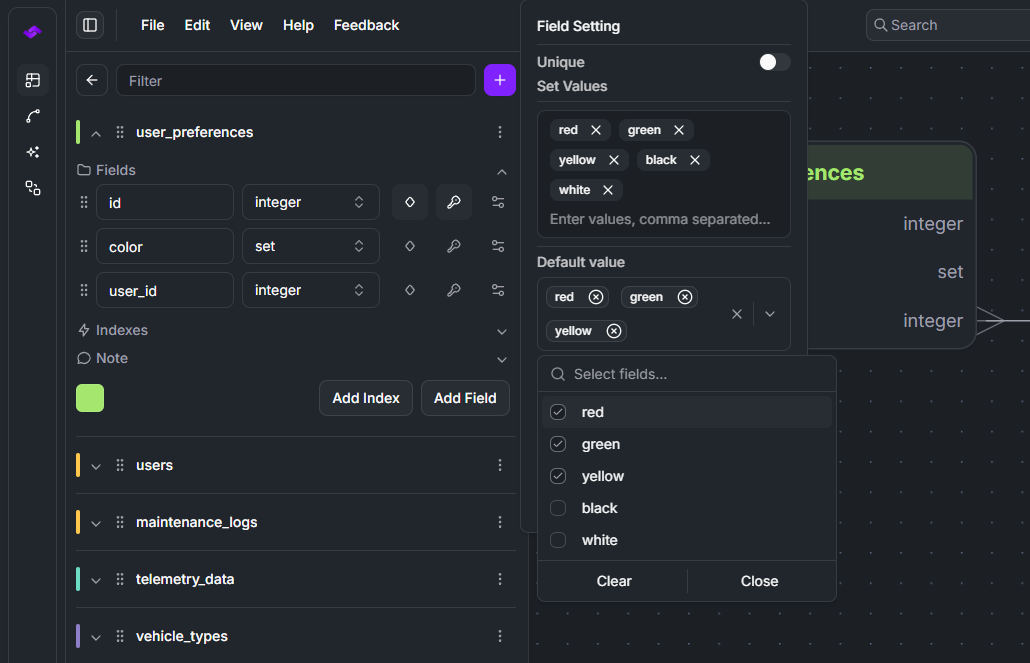
The SET data type in MySQL is similar to ENUM, but with one key difference: it allows multiple values to be selected.
In StackRender, defining a SET field works the same way as creating an ENUM. Create a field, select the SET data type, and add the allowed values in the field settings.
Additionally, MySQL SET fields support multiple default values. In StackRender, you can select multiple values in the Default Value setting to define the default selection.
-
UNSIGNED & ZEROFILL
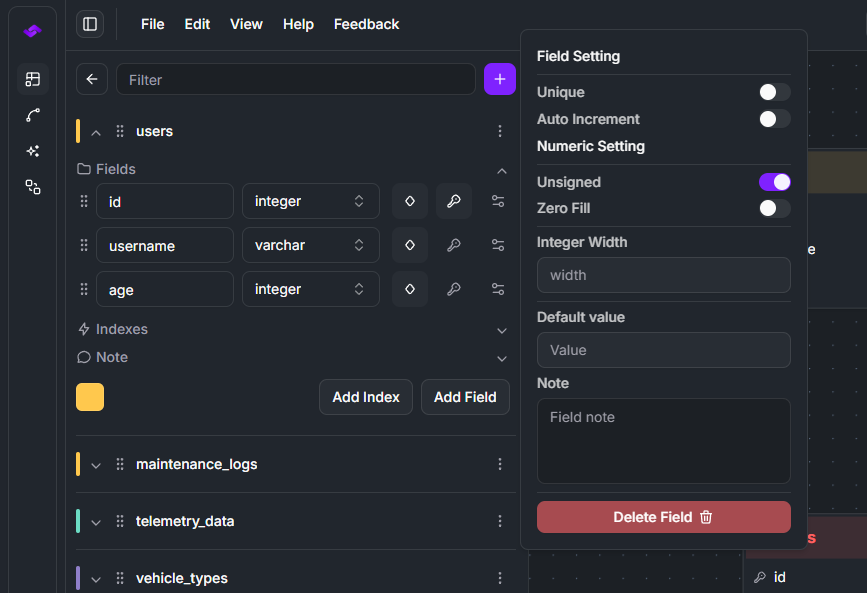
UNSIGNED and ZEROFILL are attributes supported by MySQL numeric data types, including both integer and decimal fields.
In StackRender, you can enable these options from the field settings panel. Two checkboxes are available: one for UNSIGNED and another for ZEROFILL.
Deprecated feature
These attributes are deprecated in
MySQL 8+. If the generated SQL is executed on a MySQL version newer than 8, the database may ignore these options.
-
MariaDB
-
Data Types
The following table lists the MariaDB data types supported by StackRender along with the available field modifiers. These modifiers allow you to control how each field behaves in your schema, including default values, auto-incrementing behavior, precision, length, unsigned attributes, character sets, collations, and enumerated values.
Data Type Default Value Auto Increment Unsigned ZeroFill Length Precision Scale Charset Collation Enum Values bit ✔️ ❌ ❌ ❌ ✔️ ❌ ❌ ❌ ❌ ❌ integer / int ✔️ ✔️ ✔️ ✔️ ✔️ ❌ ❌ ❌ ❌ ❌ tinyint ✔️ ✔️ ✔️ ✔️ ✔️ ❌ ❌ ❌ ❌ ❌ smallint ✔️ ✔️ ✔️ ✔️ ✔️ ❌ ❌ ❌ ❌ ❌ mediumint ✔️ ✔️ ✔️ ✔️ ✔️ ❌ ❌ ❌ ❌ ❌ bigint ✔️ ✔️ ✔️ ✔️ ✔️ ❌ ❌ ❌ ❌ ❌ float ✔️ ❌ ✔️ ✔️ ❌ ✔️ ✔️ ❌ ❌ ❌ double ✔️ ❌ ✔️ ✔️ ❌ ✔️ ✔️ ❌ ❌ ❌ decimal ✔️ ❌ ✔️ ✔️ ❌ ✔️ ✔️ ❌ ❌ ❌ boolean / bool ✔️ ❌ ❌ ❌ ❌ ❌ ❌ ❌ ❌ ❌ date ✔️ ❌ ❌ ❌ ❌ ❌ ❌ ❌ ❌ ❌ datetime ✔️ ❌ ❌ ❌ ❌ ✔️ ❌ ❌ ❌ ❌ timestamp ✔️ ❌ ❌ ❌ ❌ ✔️ ❌ ❌ ❌ ❌ time ✔️ ❌ ❌ ❌ ❌ ✔️ ❌ ❌ ❌ ❌ year ✔️ ❌ ❌ ❌ ❌ ❌ ❌ ❌ ❌ ❌ char ✔️ ❌ ❌ ❌ ✔️ ❌ ❌ ✔️ ✔️ ❌ varchar ✔️ ❌ ❌ ❌ ✔️ ❌ ❌ ✔️ ✔️ ❌ text ❌ ❌ ❌ ❌ ❌ ❌ ❌ ✔️ ✔️ ❌ tinytext ❌ ❌ ❌ ❌ ❌ ❌ ❌ ✔️ ✔️ ❌ mediumtext ❌ ❌ ❌ ❌ ❌ ❌ ❌ ✔️ ✔️ ❌ longtext ❌ ❌ ❌ ❌ ❌ ❌ ❌ ✔️ ✔️ ❌ blob ❌ ❌ ❌ ❌ ❌ ❌ ❌ ❌ ❌ ❌ tinyblob ❌ ❌ ❌ ❌ ❌ ❌ ❌ ❌ ❌ ❌ mediumblob ❌ ❌ ❌ ❌ ❌ ❌ ❌ ❌ ❌ ❌ longblob ❌ ❌ ❌ ❌ ❌ ❌ ❌ ❌ ❌ ❌ binary ❌ ❌ ❌ ❌ ✔️ ❌ ❌ ❌ ❌ ❌ varbinary ❌ ❌ ❌ ❌ ✔️ ❌ ❌ ❌ ❌ ❌ enum ✔️ ❌ ❌ ❌ ❌ ❌ ❌ ✔️ ✔️ ✔️ set ✔️ ❌ ❌ ❌ ❌ ❌ ❌ ✔️ ✔️ ✔️ json ❌ ❌ ❌ ❌ ❌ ❌ ❌ ❌ ❌ ❌ geometry ❌ ❌ ❌ ❌ ❌ ❌ ❌ ❌ ❌ ❌ point ❌ ❌ ❌ ❌ ❌ ❌ ❌ ❌ ❌ ❌ linestring ❌ ❌ ❌ ❌ ❌ ❌ ❌ ❌ ❌ ❌ polygon ❌ ❌ ❌ ❌ ❌ ❌ ❌ ❌ ❌ ❌ multipoint ❌ ❌ ❌ ❌ ❌ ❌ ❌ ❌ ❌ ❌ multilinestring ❌ ❌ ❌ ❌ ❌ ❌ ❌ ❌ ❌ ❌ multipolygon ❌ ❌ ❌ ❌ ❌ ❌ ❌ ❌ ❌ ❌ geometrycollection ❌ ❌ ❌ ❌ ❌ ❌ ❌ ❌ ❌ ❌ uuid ❌ ❌ ❌ ❌ ❌ ❌ ❌ ❌ ❌ ❌ inet4 ❌ ❌ ❌ ❌ ❌ ❌ ❌ ❌ ❌ ❌ inet6 ❌ ❌ ❌ ❌ ❌ ❌ ❌ ❌ ❌ ❌ -
Type-Specific Features
MariaDB shares most of its type-specific features with MySQL, including support for options such as Charsets, Collations, SET, and UNSIGNED / ZEROFILL attributes.
In addition, MariaDB provides extra data types supported by StackRender, including
UUIDand network address types such asINET4andINET6, which are useful for storing and managing IP addresses.
Sqlite
-
Data Types
SQLite uses a dynamic type system with a small set of core storage classes. Many data types are simply aliases or synonyms that map to the same underlying storage behavior.
The following table lists the SQLite data types supported by StackRender along with the available field modifiers. These modifiers allow you to control field behavior in your schema, including default values, auto-incrementing fields, length constraints, and numeric precision.
Data Type Default Value Auto Increment Length Precision integer ✔️ ✔️ ❌ ❌ text ✔️ ❌ ✔️ ❌ real ✔️ ❌ ❌ ❌ numeric ✔️ ❌ ❌ ✔️ blob ❌ ❌ ❌ ❌ boolean ✔️ ❌ ❌ ❌ date ✔️ ❌ ❌ ❌ time ✔️ ❌ ❌ ❌ datetime ✔️ ❌ ❌ ❌ json ❌ ❌ ❌ ❌
Oracle
-
Data Types
StackRender supports Oracle's core numeric, character, binary, temporal, LOB, XML, JSON, and ROWID data types. Depending on the selected data type, you can configure attributes such as identity (auto-increment), length, precision, scale, default values, and uniqueness constraints.
The table below shows which field attributes are available for each Oracle data type.
Data Type Default Value Auto Increment Unique Length Precision Scale number ✔️ ✔️ ✔️ ❌ ✔️ ✔️ integer ✔️ ✔️ ✔️ ❌ ❌ ❌ float ✔️ ❌ ✔️ ❌ ✔️ ❌ binary_float ✔️ ❌ ✔️ ❌ ❌ ❌ binary_double ✔️ ❌ ✔️ ❌ ❌ ❌ varchar2 ✔️ ❌ ✔️ ✔️ ❌ ❌ char ✔️ ❌ ✔️ ✔️ ❌ ❌ nchar ✔️ ❌ ✔️ ✔️ ❌ ❌ nvarchar2 ✔️ ❌ ✔️ ✔️ ❌ ❌ clob ❌ ❌ ❌ ❌ ❌ ❌ nclob ❌ ❌ ❌ ❌ ❌ ❌ blob ❌ ❌ ❌ ❌ ❌ ❌ bfile ❌ ❌ ❌ ❌ ❌ ❌ raw ❌ ❌ ✔️ ✔️ ❌ ❌ date ✔️ ❌ ✔️ ❌ ❌ ❌ timestamp ✔️ ❌ ✔️ ❌ ✔️ ❌ timestamp with time zone ✔️ ❌ ✔️ ❌ ✔️ ❌ timestamp with local time zone ✔️ ❌ ✔️ ❌ ✔️ ❌ interval year to month ❌ ❌ ✔️ ❌ ✔️ ❌ interval day to second ❌ ❌ ✔️ ❌ ✔️ ❌ rowid ❌ ❌ ❌ ❌ ❌ ❌ urowid ❌ ❌ ❌ ❌ ❌ ❌ xmltype ❌ ❌ ✔️ ❌ ❌ ❌ json ❌ ❌ ✔️ ❌ ❌ ❌
SQL Server
-
Data Types
StackRender supports the most commonly used SQL Server data types, including numeric, character, binary, temporal, UUID, XML, JSON, and spatial types. Field configuration options vary by data type and may include identity columns, default values, uniqueness constraints, length, precision, and scale.
The table below outlines the supported attributes for each SQL Server data type.
Data Type Default Value Auto Increment Unique Length Precision Scale tinyint ✔️ ✔️ ✔️ ❌ ❌ ❌ smallint ✔️ ✔️ ✔️ ❌ ❌ ❌ int ✔️ ✔️ ✔️ ❌ ❌ ❌ bigint ✔️ ✔️ ✔️ ❌ ❌ ❌ decimal ✔️ ❌ ✔️ ❌ ✔️ ✔️ float ✔️ ❌ ✔️ ❌ ✔️ ❌ real ✔️ ❌ ✔️ ❌ ❌ ❌ money ✔️ ❌ ✔️ ❌ ❌ ❌ smallmoney ✔️ ❌ ✔️ ❌ ❌ ❌ char ✔️ ❌ ✔️ ✔️ ❌ ❌ varchar ✔️ ❌ ✔️ ✔️ ❌ ❌ text ✔️ ❌ ✔️ ❌ ❌ ❌ nchar ✔️ ❌ ✔️ ✔️ ❌ ❌ nvarchar ✔️ ❌ ✔️ ✔️ ❌ ❌ ntext ✔️ ❌ ✔️ ❌ ❌ ❌ binary ❌ ❌ ✔️ ✔️ ❌ ❌ varbinary ❌ ❌ ✔️ ✔️ ❌ ❌ image ❌ ❌ ❌ ❌ ❌ ❌ date ✔️ ❌ ✔️ ❌ ❌ ❌ time ✔️ ❌ ✔️ ❌ ✔️ ❌ datetime ✔️ ❌ ✔️ ❌ ❌ ❌ smalldatetime ✔️ ❌ ✔️ ❌ ❌ ❌ datetime2 ✔️ ❌ ✔️ ❌ ✔️ ❌ datetimeoffset ✔️ ❌ ✔️ ❌ ✔️ ❌ uniqueidentifier ✔️ ❌ ✔️ ❌ ❌ ❌ bit ✔️ ❌ ✔️ ❌ ❌ ❌ json ✔️ ❌ ✔️ ❌ ❌ ❌ xml ✔️ ❌ ✔️ ❌ ❌ ❌ geometry ✔️ ❌ ✔️ ❌ ❌ ❌ geography ✔️ ❌ ✔️ ❌ ❌ ❌
Date & Time
Date and time data types are supported across all four database dialects in StackRender. These fields also come with additional options for default values, allowing you to define how records are initialized automatically.
-
DateTime
Supported date time data types:
- DATETIME
- TIMESTAMP
- TIMESTAMPTZ
In StackRender, these types support three default value options:
- No Default Value – the field will remain empty unless explicitly set.
due_date TIMESTAMP NOT NULL - Custom Default Value – specify a fixed value to be assigned by default.
fixed_date TIMESTAMP NOT NULL DEFAULT '2026-03-11 03:08:25' NOW()Function – automatically sets the field to the current date and time when a record is created.created_at TIMESTAMPTZ NULL DEFAULT CURRENT_TIMESTAMP
-
Date
The DATE data type is supported by all four database dialects. It is used to store calendar dates and supports a custom default value or can be left empty. You can configure this directly in StackRender’s field settings for your database schema.
certification_date DATE NULL DEFAULT '1999-01-01' -
Year
The YEAR data type is specific to MySQL and MariaDB. It is used to store year values and supports setting a custom default value or leaving the field empty. StackRender allows you to configure this directly in the field settings for your database schema.
construction_year YEAR NULL DEFAULT '1999' -
TIME
The TIME data type is supported by all four database dialects. It is used to store time values and allows setting a custom default value directly in StackRender’s field settings. You can also leave the field empty if no default is required.
check_in TIME NULL DEFAULT '08:00:00'
Table & Fields
Learn how to create and manage tables and fields in StackRender to build and organize your database schema. This guide explains how to define tables, add fields, and structure your data using the diagram editor.
Relationships
Learn how to create database relationships and configure foreign key actions in StackRender.